

If you’ve been watching the BI space in 2025–2026, you’ve seen every major tool slap “AI” on its product page. Metabase is no exception — but whether the AI is actually useful is a different question.
Metabase has a reputation for being the friendliest open-source BI tool for non-technical teams. So when they added Metabot, their AI assistant, the promise was appealing: ask questions in plain English, get SQL and charts back automatically. No query builder. No SQL required.
This article gives you an honest look at what Metabase AI actually does — how Metabot works step by step, where it genuinely helps, where it struggles, and how it stacks up against Power BI Copilot and Tableau Pulse.
What AI Features Does Metabase Have?
Metabase’s AI offering centers on four capabilities, not all of which are available on the same plan:
1. Metabot (Natural Language Querying)
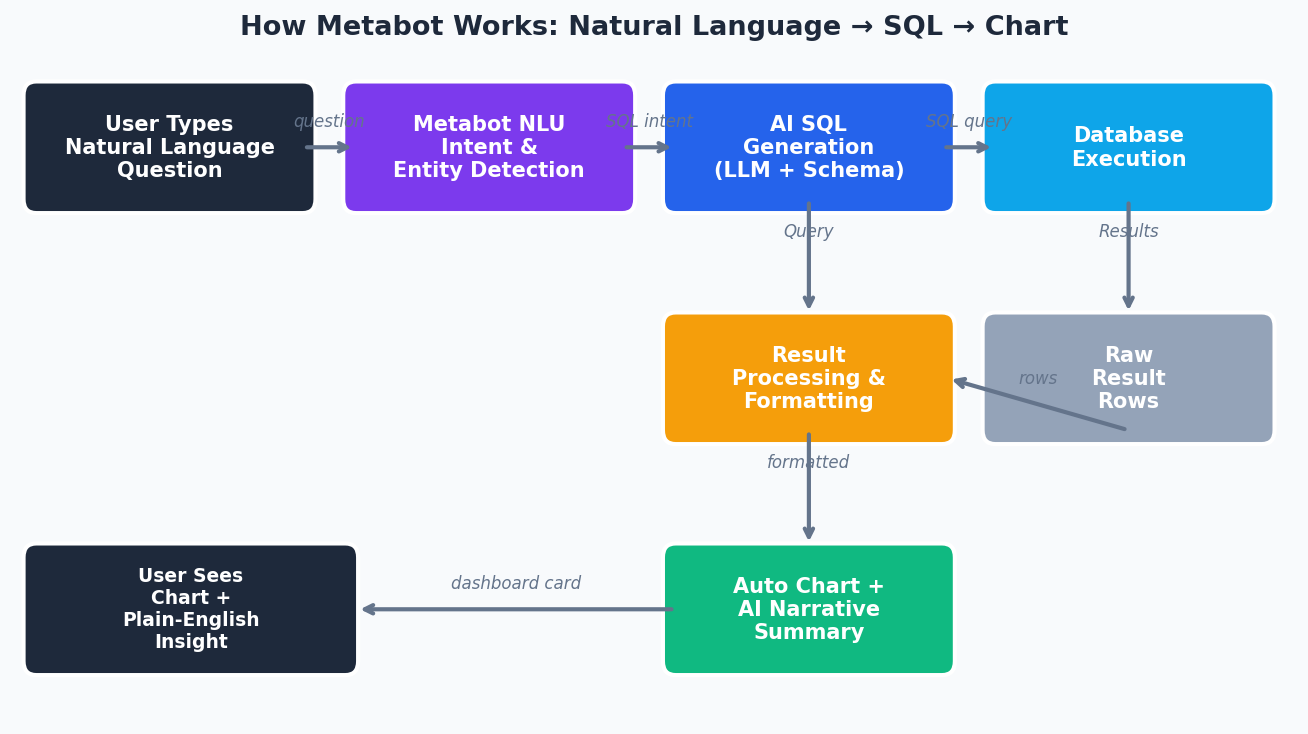
The flagship AI feature. Users type a question in plain English — “How many orders did we receive last week broken down by region?” — and Metabot generates a SQL query, runs it, and returns a visualization. Metabot first checks whether an existing dashboard or saved question already answers what you’re asking. If it finds a match, it surfaces that. If not, it generates SQL from scratch using your semantic layer.
2. SQL Generation and Debugging
Beyond answering questions, Metabot can write SQL for you from a prompt and — importantly — debug SQL that’s failing. You paste in a broken query, describe the error, and Metabot suggests a fix. This is available even on the free Open Source tier (with limitations — more on that below).
3. AI-Powered Chart Summaries
Metabot can convert a chart into a plain-language summary. Instead of reading axis values and drawing your own conclusions, you get a one-paragraph explanation of what the chart shows. Useful for embedding explanations in dashboards for less technical stakeholders.
4. Context-Aware Conversations
Metabot’s responses aren’t fully stateless. It understands the context of your data models, your company’s semantic layer, and the permissions associated with your login. It won’t show you data you’re not supposed to see — it runs queries using your user-level permissions.
How Metabot Works — A Practical Walkthrough
Here’s what actually happens when you ask Metabot a question.
Step 1: You type a natural language question
You navigate to the Metabot interface (available in the sidebar or search bar in Metabase) and ask something like:
“Show me total revenue by product category for Q1 2025, excluding refunds”
Step 2: Metabot searches your existing content first
Before generating anything new, Metabot scans existing questions and dashboards your team has already built. If there’s a saved “Revenue by Category” question, Metabot surfaces it — along with a note about which model and metrics were used. This is genuinely useful: it avoids duplicating work and surfaces institutional knowledge.
Step 3: If nothing exists, it generates SQL
Metabot writes SQL against your semantic layer — the models, joins, and field definitions you’ve configured in Metabase’s data model. A question like the one above might produce:
SELECT
  p.category,
  SUM(o.total_amount) AS total_revenue
FROM orders o
JOIN products p ON o.product_id = p.id
WHERE o.order_date BETWEEN '2025-01-01' AND '2025-03-31'
  AND o.status != 'refunded'
GROUP BY p.category
ORDER BY total_revenue DESC
Step 4: You review and adjust
Metabot doesn’t lock you in. You can open the generated SQL in the native SQL editor, modify it, and re-run. Or you can click into the query builder if you prefer a no-code interface. The AI output is a starting point, not a final answer.
Step 5: You get a chart + optional summary
Metabase automatically selects a chart type based on the data shape. You can request a different visualization (“show this as a pie chart”) or ask Metabot to summarize the result in plain language.
What Metabase AI Does Well
1. It respects your data model — and your permissions
This is the most underrated strength. Metabot doesn’t just fire arbitrary queries at your database. It works within the models and metrics you’ve defined in Metabase’s semantic layer. That means if your team has invested in defining clean models with good field labels and descriptions, Metabot’s output is significantly more accurate and business-relevant.
The permission enforcement is equally important. A sales rep asking Metabot “show me all deals by rep” only sees their own territory’s data — the same restrictions that apply everywhere else in Metabase apply to Metabot too.
2. SQL debugging actually saves time
The “debug this SQL” use case doesn’t get enough press. When a query fails with a cryptic error, pasting it into Metabot and getting an explanation of why it broke — plus a suggested fix — is genuinely faster than hunting through stack traces. Data analysts who write SQL daily will find this useful even if they don’t need the NLQ features.
3. It surfaces institutional knowledge
Metabot’s behavior of searching existing content before generating new queries is smart. In most data teams, there are dozens of “how do I calculate X?” questions that have already been answered in some saved dashboard or report. Metabot acts as a discovery layer for that institutional knowledge, which has real value as teams and data assets grow.
4. Self-hosted option at lower cost than competitors
For teams who need AI analytics but can’t route company data through a SaaS vendor’s cloud, Metabase’s self-hosted deployment is a meaningful differentiator. Power BI Copilot and Tableau Pulse are cloud-only. Metabase with Metabot can run entirely on your infrastructure.
Where Metabase AI Falls Short
Being honest about limitations matters here, because the AI marketing can outpace reality.
Complex multi-step reasoning is unreliable
Metabot handles simple analytical questions well. But questions that require chained logic — “Compare the LTV of customers who bought in Q1 2024 vs Q1 2025, adjusting for cohort size” — often produce either incorrect SQL or a fallback to surfacing the closest existing content. For anything beyond single-table aggregations or simple joins, expect to verify (and often edit) the output.
Semantic layer quality determines everything
If your Metabase data models are messy — poorly named columns, missing descriptions, ambiguous join paths — Metabot’s output degrades sharply. The AI is only as good as the metadata it has access to. Teams that haven’t invested in data modeling will see worse results than the demos suggest.
The add-on pricing adds up
On the Starter plan ($100/month base), Metabot is an additional $100/month for 500 requests. That’s $0.20 per question. At moderate usage across a 10-person team, that cost climbs quickly. The Open Source tier only gets single-shot SQL generation — no conversation, no debugging loop, no summaries.
It’s not truly conversational (yet)
Metabot doesn’t maintain a full multi-turn conversation the way a chat interface like ChatGPT does. You can’t say “now break that down by month” as a natural follow-up without re-specifying the full context. Each interaction is closer to a single prompt-response cycle than a true back-and-forth dialogue.
No proactive insights
Metabot waits for you to ask. It doesn’t proactively flag anomalies, surface unexpected trends, or send you alerts about changes in your data. If you need AI that monitors and notifies, that’s not what Metabot does — at least not yet.
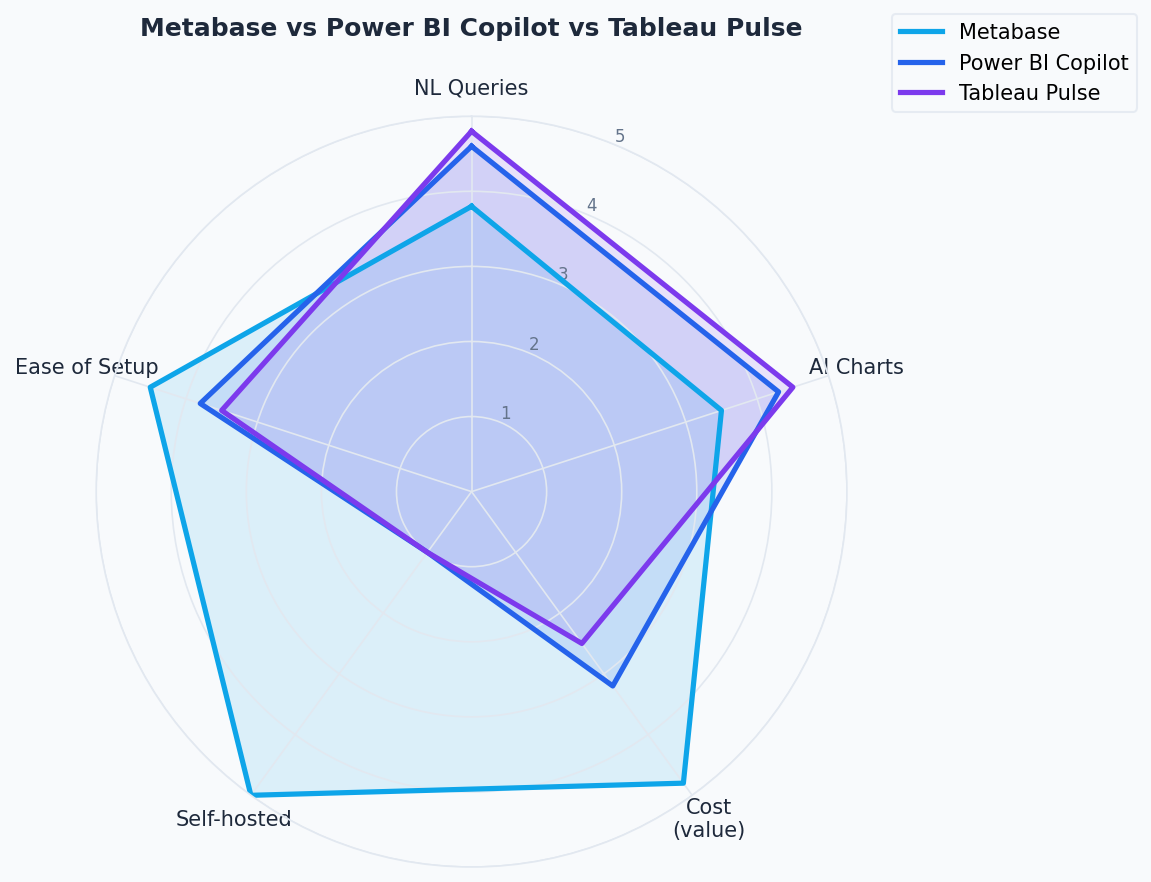
Metabase AI vs. Power BI Copilot vs. Tableau Pulse
Here’s how the three tools compare on the dimensions that matter most to data teams:
| Feature | Metabase (Metabot) | Power BI Copilot | Tableau Pulse |
|---|---|---|---|
| Natural language query | Yes — generates SQL, surfaces existing content | Yes — chat with reports and semantic model | Yes — conversational metric exploration |
| AI chart generation | Yes — auto-selects chart type, generates from NLQ | Yes — creates and modifies report visuals | Limited — focused on metrics, not chart creation |
| SQL generation | Yes — full SQL generation + debugging | Yes — DAX generation (not raw SQL) | No — abstracted above SQL layer |
| Chart summaries | Yes — converts charts to plain language | Yes — report summaries in the Copilot pane | Yes — natural language insight summaries |
| Proactive insights | No | Limited (via subscriptions) | Yes — core feature; detects trends/anomalies automatically |
| Self-hosted option | Yes | No (cloud-only) | No (cloud-only) |
| Pricing for AI | $100/mo add-on (Starter/Pro) | Requires Fabric F2+ or Power BI Premium P1+ capacity | Included in Tableau Cloud; Enhanced Q&A requires Tableau+ |
| Entry cost for AI | ~$200/month (plan + Metabot add-on) | Fabric F2 starts at ~$263/month | Tableau Cloud Creator starts at $75/user/month |
| Operates on permissions | Yes — uses logged-in user’s permissions | Yes — respects Power BI row-level security | Yes — tied to Tableau permissions |
The honest verdict:
- Choose Metabase Metabot if you’re already on Metabase, value self-hosting, and need SQL generation + debugging for a technical audience. It’s not magic, but it’s practical.
- Choose Power BI Copilot if your org is in the Microsoft ecosystem and already has Fabric capacity. The DAX generation alone is valuable for report authors. But the licensing requirements are real — this isn’t a free upgrade.
- Choose Tableau Pulse if you want proactive AI — the kind that monitors your metrics and tells you when something unexpected happens, rather than waiting for you to ask. It’s better for executive and business audiences than for analysts writing queries.
Is Metabase AI Good Enough for a Data Team?
That depends on what your team actually needs from AI.
Metabot is a good fit if:
- You’re a data team supporting non-technical stakeholders who want self-serve analytics
- Your team has invested in clean data models with good metadata in Metabase
- You need AI that respects permissions and can run on-premises or in a private cloud
- SQL debugging assistance has real daily value to your analysts
Metabot is NOT a good fit if:
- You need AI that proactively monitors data and surfaces anomalies
- Your data models are under-documented (garbage in, garbage out)
- Your team needs truly conversational, multi-turn analytics dialogue
- Budget is tight and $200/month for a 500-request cap feels constraining
- You’re in the Microsoft or Salesforce ecosystem where Copilot or Pulse is a natural extension
The most honest summary: Metabot is a capable, grounded AI assistant that does a few things reliably well. It’s not a replacement for SQL knowledge on your team — it’s a productivity layer on top of it. Data analysts who know SQL will get the most out of it. Business users hoping to skip SQL entirely will find it useful for simple questions and frustrating for complex ones.
How to Learn Metabase (If You’re Just Getting Started)
If you’re evaluating Metabase or want to get your team up to speed, the best starting point is building a solid foundation in BI and data visualization before layering in the AI features.
DataCamp has courses covering business intelligence tools, SQL, and data visualization — skills that directly translate to getting more out of Metabase’s query builder, data modeling capabilities, and yes, getting better results from Metabot. A strong grasp of SQL means you can actually verify what Metabot generates, which makes you a better user of the tool — not a dependent one.
Explore DataCamp’s BI and analytics curriculum at letdataspeak.com/go/datacamp.
For the AI features specifically: Metabase’s own documentation is the most accurate source, and the open-source community (GitHub issues, the Metabase forum) surfaces real-world edge cases and workarounds that no blog post will capture.
Bottom line: Metabase AI is worth trying if you’re already in the Metabase ecosystem — the SQL debugging and natural language query features are genuinely useful for daily analyst work. But go in with calibrated expectations: it’s a solid AI assist tool, not an autonomous analyst.